Home
 PluralMatrix
PluralMatrix is a Matrix Application Service designed for plural systems using Matrix, the open-source alternative to Discord. As in PluralKit, message prefixes are used to speak as each system member. But in PluralMatrix, every system member is represented by a unique “ghost” user who automatically joins rooms and sends messages on that member’s behalf, providing a more native Matrix experience.
Deployment & Compatibility: PluralMatrix is an Application Service requiring administrative access and installation on your homeserver; it cannot be invited to third-party servers like matrix.org. The “Zero-Flash” feature requires a custom Synapse module, but all other functionality—including E2EE and the web dashboard—is compatible with any standard Matrix server.
Visuals #
Core Features #
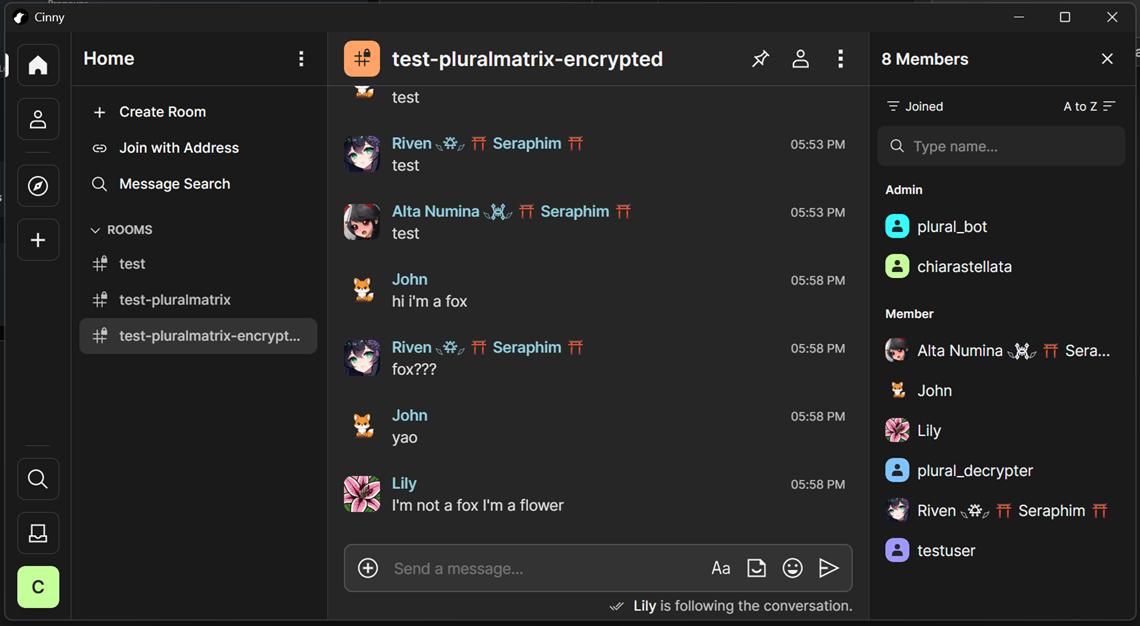
High-Fidelity Proxying (“Zero-Flash”)
- Instant Cleanup: A custom Synapse module intercepts and drops original proxy trigger messages before they are stored, ensuring a clean timeline without original messages ever appearing.
- Rich Presence: Proxied messages use custom display names, avatars, and system tags.
- Relation Preservation: Full support for replies and other Matrix event relations.
Native E2EE Support
- Full Encryption: The bot and all system ghosts natively send and receive encrypted messages via the Matrix Rust SDK, ensuring high-fidelity proxying in secure rooms.
- Secure by Design: Automated registration and secure cryptographic state management for all system identities.
Modern Dashboard
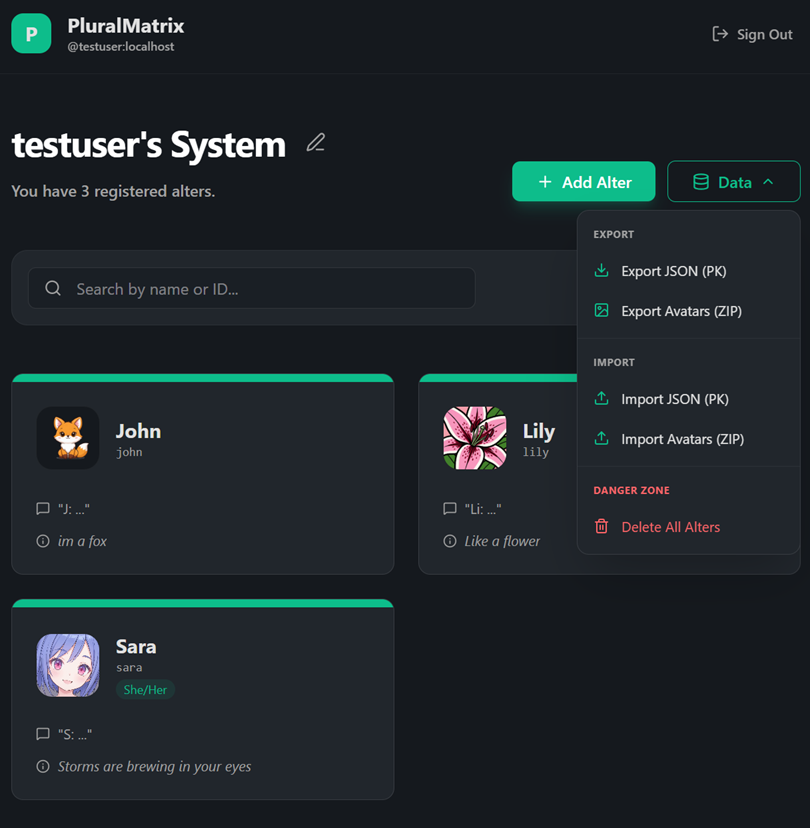
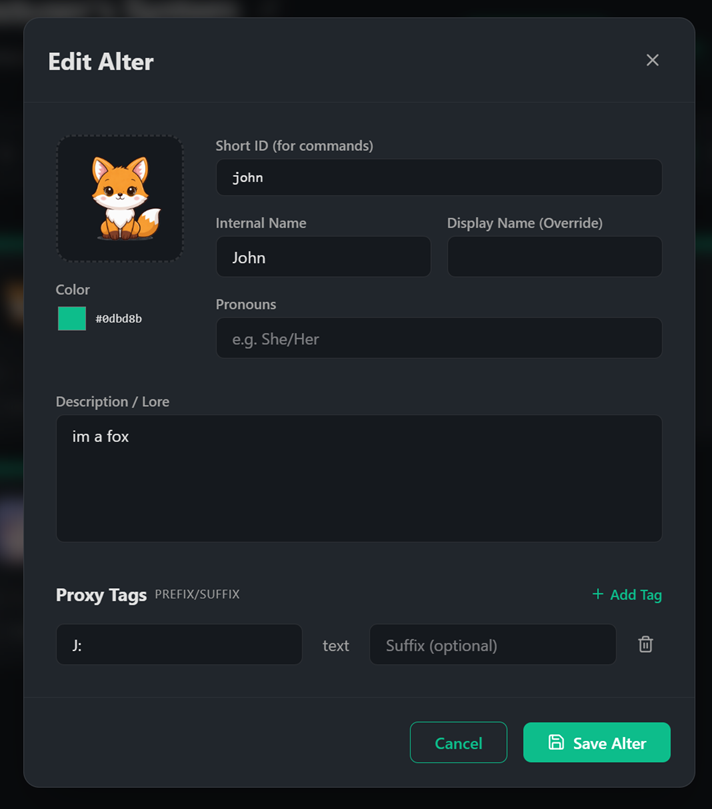
- Web-based Management: A React-based UI for managing system members, settings, and avatars.
- Matrix Authentication: Sign in directly using your Matrix credentials.
- Live Sync: Real-time updates to ghost profiles and proxy rules.
Data Portability (PluralKit Compatible)
- Easy Migration: Import your system directly from a PluralKit JSON export.
- Full Exports: Export your system data and avatar assets (ZIP) for backup or migration.
- Roundtrip Fidelity: Maintains IDs and slugs for consistent cross-platform use.
Advanced Bot Commands
These commands are designed to work exactly like their PluralKit equivalents for familiarity and ease of use.
pk;list: View all system members.pk;member <slug>: View detailed information about a member.pk;e <text>: Edit your last proxied message or a specific replied-to message.pk;rp <slug>: Change the identity of a previously proxied message (Reproxy).pk;message -delete: Remove a proxied message.- Emoji Reactions: React with ❌ to any proxied message to delete it instantly.
Smart System Management
- Automatic Slugs: Generates clean, unique IDs for members from names or descriptions.
- Ghost Decommissioning: Automatically cleans up ghost users and their room memberships when a member is deleted.
- Profile Syncing: Ensures global Matrix profiles stay in sync with your system dashboard.
Privacy & Security Considerations #
PluralMatrix requires access to message content to function. Users and server administrators should be aware of the following:
- Server Admin Access: The administrator of the server running the PluralMatrix application service has access to all messages sent to and from
@plural_botand the ghost users. This is unavoidable because the application service must store the cryptographic keys required to decrypt your proxy commands and encrypt the resulting ghost messages. - Message Decryption in Memory: In order to check if a message contains a proxy tag, the bridge must decrypt the message. This means messages sent in rooms where the bot is present will temporarily exist in cleartext within the server’s memory.
- Database Storage: While message history is not retained by the bridge, any system member data you create or import (names, avatars, proxy tags, etc.) is stored in the PluralMatrix PostgreSQL database.
- Homeserver Visibility: Because the bot and ghost users participate in your rooms, the homeserver hosting PluralMatrix will receive and store a copy of the room’s encrypted event history, just like any other user’s homeserver in a federated room.
Installation & Setup #
Prerequisites
- Docker & Docker Compose
- A Matrix Homeserver (Synapse required for Zero-Flash support)
Quick Start
- Clone the repository from GitHub:
git clone https://github.com/pluralmatrix/pluralmatrix.git cd pluralmatrix - Run the setup script:
./setup.sh - Run the restart script to initialize the services:
./restart-stack.sh - Invite
@plural_bot:yourdomain.comto the rooms you wish to use it in. - Access the dashboard at
http://localhost:9000.
Note: By default, PluralMatrix launches its own Synapse demo server for local testing, but it can be easily configured to integrate with any existing Matrix homeserver. See our Existing Server Integration Guide for detailed instructions.
Client Configuration #
For the best experience and a clean timeline, we recommend these client-specific settings (last tested February 2026).
Note: With the Synapse Zero-Flash patch, onlookers can use any client without seeing placeholders; only the sender needs these settings to hide their own redacted original messages.
Mobile
- ⚙️ Element Classic: Disable Settings → Preferences → Show removed messages.
- ❌ Element X: Not recommended (no option to hide redacted messages).
- ⚙️ FluffyChat: Enable Settings → Chat → Hide redacted messages.
- ✅ SchildiChat Legacy: Disable Settings → Preferences → Timeline → Show removed messages (off by default).
- ❌ SchildiChat Next: Not recommended (no option to hide redacted messages).
Desktop / Web
- ✅ Cinny: Ensure Settings → General → Show Hidden Events is disabled (off by default).
- ⚙️ Element: Disable Settings → Preferences → Timeline → Show a placeholder for removed messages.
- ⚙️ FluffyChat: Enable Settings → Chat → Hide redacted messages.
- ✅ Fractal: Hides deleted messages by default—no configuration needed!
- ⚙️ NeoChat: Disable Settings → General → Show deleted messages.
- ❌ nheko: Not recommended (no option to hide redacted messages).
- ✅ SchildiChat Desktop (deprecated): Disable Settings → Preferences → Timeline → Show a placeholder for removed messages (off by default).
- ✅ SchildiChat Revenge: Disable Settings → Conversation screen → Show deleted messages (off by default).
Testing #
PluralMatrix includes a comprehensive test suite covering the App Service (unit and E2E) and the Synapse module.
App Service (Backend & E2E)
Run the full suite of unit and end-to-end tests using the provided runner script:
cd app-service
./test.sh
This script handles Matrix Rust SDK cleanup gracefully and ensures the process exits correctly.
Synapse Module (Python)
Run the unit tests for the custom Synapse gatekeeper module directly inside the container:
./synapse/modules/test.sh
Support #
Need help or want to provide feedback? You can reach out through the following channels:
- Matrix: Join our support room at #pluralmatrix-support:hypersystem.xyz
- Email: Contact the developer at chiara@pluralmatrix.org
- GitHub: File a bug report or feature request on our Issues page